

Can a solo developer really build a SaaS app?
It’s a fair question, and if you’re asking it, chances are you’re staring down the long road. You know, from idea to launch, and wondering if it’s even possible to walk it alone.
The short answer? Yes, you can.
As a developer and a Saas Browser founder myself, I know that coding the app is the easiest part. The real challenge is knowing what to build, who it’s for, how to stay resource-efficient, and how to make it worth your time. That’s where most solo founders slip.
In this guide, we’ll break it all down step by step: how other solo developers have launched successful SaaS apps, how to validate your idea, and how tools like SaaS Browser can help you shortcut months of trial and error. Let's dig in.
Why build a SaaS app solo? The upsides are real
Before we dive in, just know that you're considering the right approach! Building software on your own is one of the smartest ways to create a successful SaaS app. When you're working solo, you get full control, faster execution, and fewer distractions. Yes, it’s demanding, but the benefits can make it deeply rewarding.
Here’s what makes the solo path not only possible for a solo developer, but lucrative:
- Full ownership and control. You make every decisio, product, pricing, roadmap. No compromises, no committees.
- Low overhead and lean operations. With minimal development expenses and no payroll, even modest revenue can be meaningful.
- Speed and agility. No meetings. No blockers. Ideate, code, and ship, sometimes in the same day.
- Massive skill growth. You’ll learn everything: SaaS development, marketing, database management, customer support, and become a true product generalist.
- You keep all the profits. 100% of revenue (after expenses) is yours. No dilution, no equity drama.
- Lifestyle flexibility. You set the hours, the pace, and the direction. Build around your life, not the other way around.
Building a SaaS app as a solo developer isn’t easy, of course. But it’s absolutely possible to create and launch something real, profitable, and yours.
1. Start smart: Why idea selection makes or breaks solo SaaS
You can code fast, but you can't out-code a bad idea.
This is where most SaaS application solo developers trip up. They fall in love with the build and skip the question that really matters: “Is this a problem people care enough about to pay for?”
As a developer, it’s tempting to trust your instincts. But that’s how you end up spending six months building a brilliant app no one really needs.
The idea stage of software development is critical
The majority of failed startups fail due to a lack of market need. Not a lack of funding. Not technical issues. Just plain misalignment between what was built and what people actually wanted.
The trap is subtle, especially if you're solving your own pain.
That’s a great place to start, but it’s not enough. You need evidence that your pain is shared by others, and that they’re actively looking (or paying) for solutions. That’s where most guides stop. Let’s go deeper.
What actually makes a good SaaS business idea?
Based on patterns from thousands of solo SaaS projects on SaaS Browser, here’s what tends to work:
1. It’s painfully specific. You’re not building “a project management tool.” You’re building a task-tracking board for UX freelancers working with non-technical clients. Niche is not a limitation, it’s a superpower.
2. It’s scoped to be built by one person
Some markets are structurally hostile to solo devs, financial planning and mental health. Others, like time tracking and productivity tools or B2B admin utilities, are ideal for solo execution.
3. There’s proof of life
Other products exist, and that’s good. You want signs that people are solving this with spreadsheets, duct-taped workflows, or overpriced platforms. That’s market pull. But you also need signs of opportunity. Think unpolished apps, companies with no traction, or markets that haven't been updated
Use SaaS Browser to spot ideas with pull (not saturation)
Most solo founders rely on gut feel, or scrape together partial views from Crunchbase, Product Hunt, and random Google results. But here’s the problem:
- Crunchbase tracks companies, not products
- Product Hunt shows launches, not success
- And Google shows what ranks, not what works
SaaS Browser flips that. It gives you a full search engine for SaaS, not by what’s popular, but by what’s real and live, and running.
Here’s how to use it to pressure test your idea:
1. Filter by category
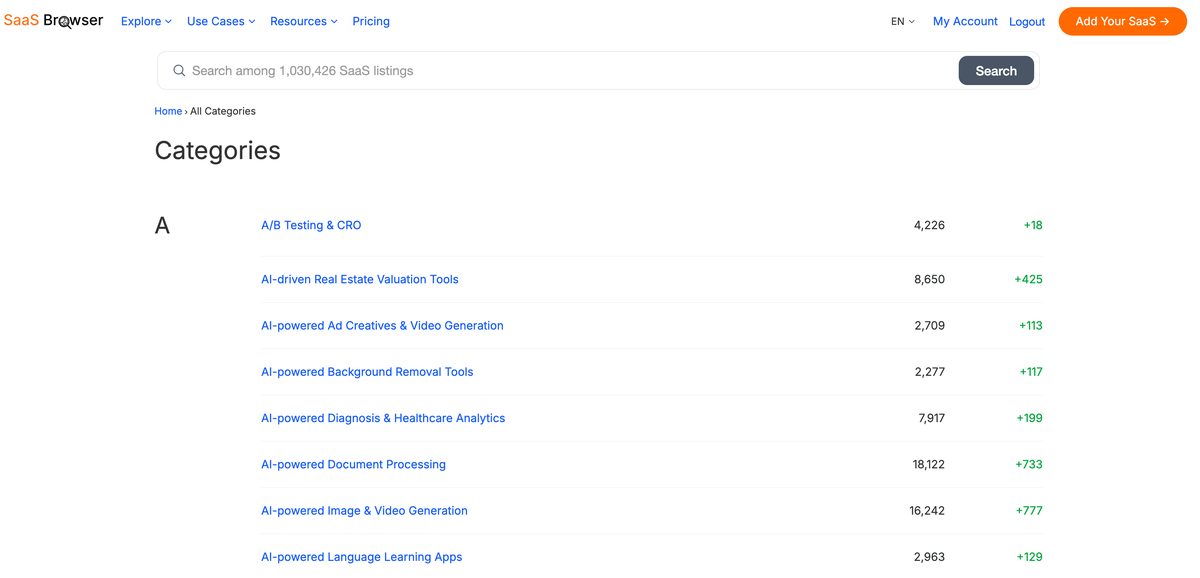
Let’s say you want to build a scheduling tool for language tutors. Use SaaS Browser to search within the “Education” or “Scheduling” category and combine that with filters for team size, revenue, and domain authority. You’ll instantly see if this space is crowded with funded teams or wide open with low-DA solo apps.
2. Track launches by 1000 fast-growing SaaS companies
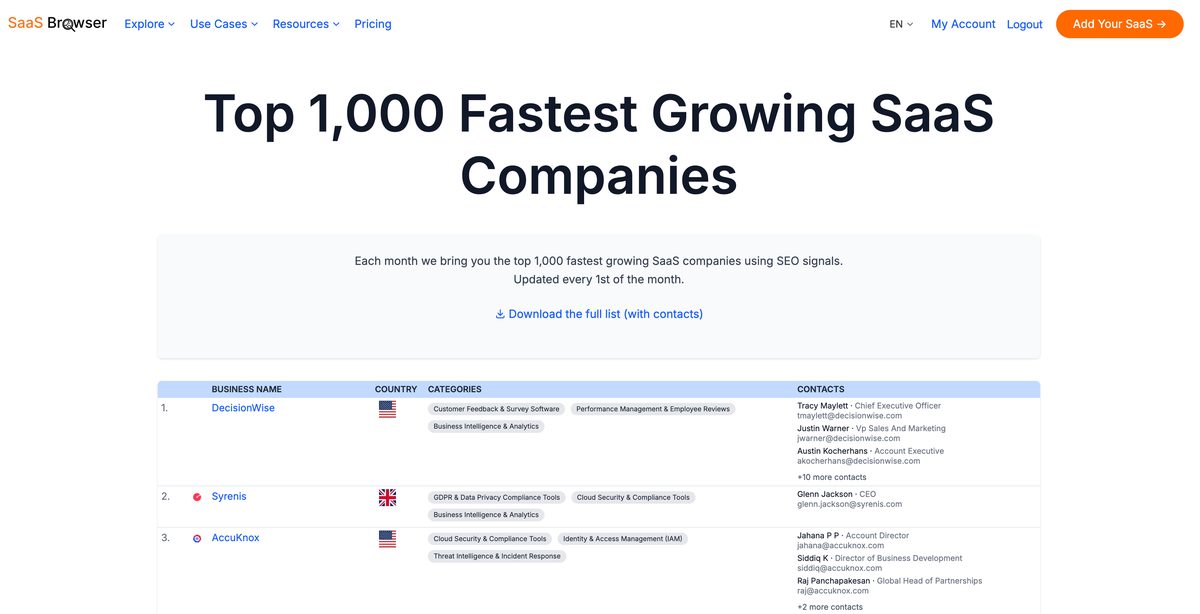
Want to know if “habit tracker” apps are still viable in 2025? Use the “year founded” filter to track how many apps in that space have launched recently. If most were launched between 2018–2020 and few since, that might mean a fatigue in the space, or an opportunity for a fresh take.
3. Spot gaps in positioning
Many SaaS apps look alive, but when you filter by backlinks or traffic growth, you’ll see who’s actually getting attention. If there are 12 competitors but only one with visible traction, that’s not saturation, that’s a gap waiting to be filled.
2. Validate before you build: Don’t waste six months coding in the dark
Before you commit to building, test one thing: do people care enough about the problem to pay for a solution?
Here’s how to do that fast and lean:
1. Check the market
Use SaaS Browser to instantly see if similar tools exist. Filter by category, pricing model, revenue, and traction to answer:
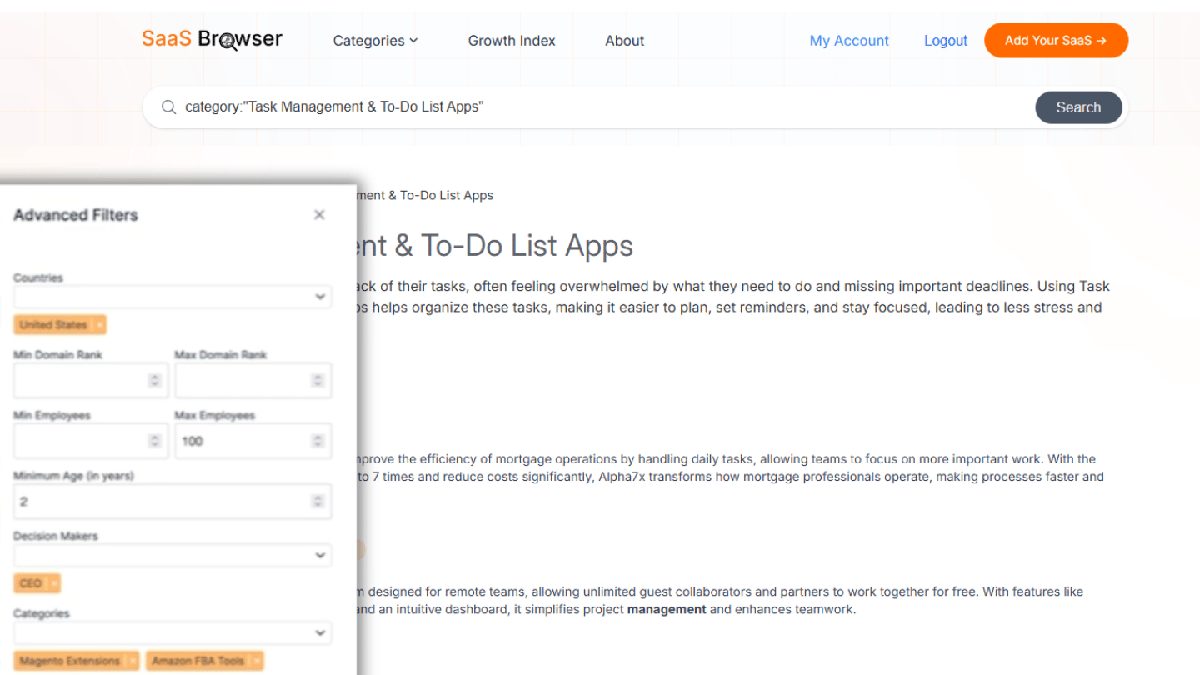
- Is this space overcrowded?
- Are most apps dead on arrival?
- Which ones are quietly winning?
If you find a dozen low-traffic clones, that’s a red flag. If you find one with serious traction and the rest inactive, that’s a gap.
2. Run a smoke test
Create a simple landing page with one clear value proposition and a strong CTA (like a waitlist or early access). Share it in niche communities, forums, Reddit, or even run low-cost ads.
If 20+ out of 100 visitors sign up, you're onto something. If no one bites, your offer needs work.
3. Talk to users, but ask smarter questions
Don’t pitch your idea — ask how they’re solving the problem today, what frustrates them, and what tools they’ve tried.
If they mention workarounds or messy spreadsheets, you’ve found a real pain point. Follow The Mom Test: if people just say “cool idea,” you’re not asking the right questions.
4. Try the “Wizard of Oz” method
Offer the result your app promises, but deliver it manually behind the scenes if need be. Say you're building an automated reporting tool? Just send reports by hand for now. If users love it and keep using it, then it’s worth building the backend.
This is exactly how I constructed the growth index. The value is straightforward, you get the top 1,000 fastest-growing SaaS companies by SEO signals. Alongside company details, with a simple click of a button, you get verified contact details from an employee whom you can get in touch with.
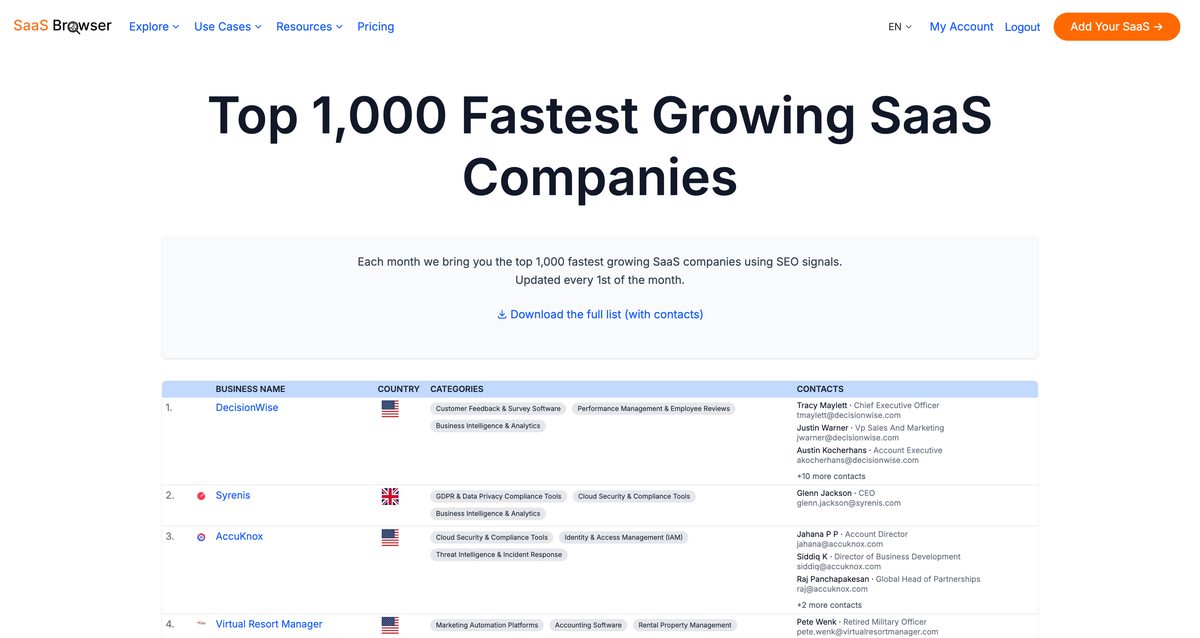
The delivery? It’s a sheet document because the value for now is pretty obvious.
3. Build the right MVP: Ship small, solve hard
We know you've seen many MVP types of articles, so we'll keep it straight.
Your goal in solo development, of course, isn’t to build everything — it’s to prove that one thing you’re solving is valuable enough that someone will use it, or better yet, pay for it. That’s your Minimum Viable Product.
The smaller your MVP, the faster you get to that proof.
Start by listing all the features you think your app should have, then strip it down to the core. Your MVP should deliver one clear outcome. If you’re building a scheduling tool, just let someone schedule something — that’s the job to be done.
The same thinking applies to your tech stack. Use whatever lets you move fast, avoid complexity and don't complicate your SaaS development process.
Rails, Django, Laravel — these frameworks come with auth, database setup, and admin panels out of the box. You don’t need microservices or Kubernetes to validate an idea. You just need a working flow and users on it. Platforms like SaaS Pegasus or Laravel Spark can save you weeks of boilerplate work. Successful SaaS developer relies on these kinds of shortcuts to get to market quickly.
Once you’ve scoped your MVP, you can actually check what other early-stage apps in your space launched with. Check your category on SaaS browser and get all the relevant data there.
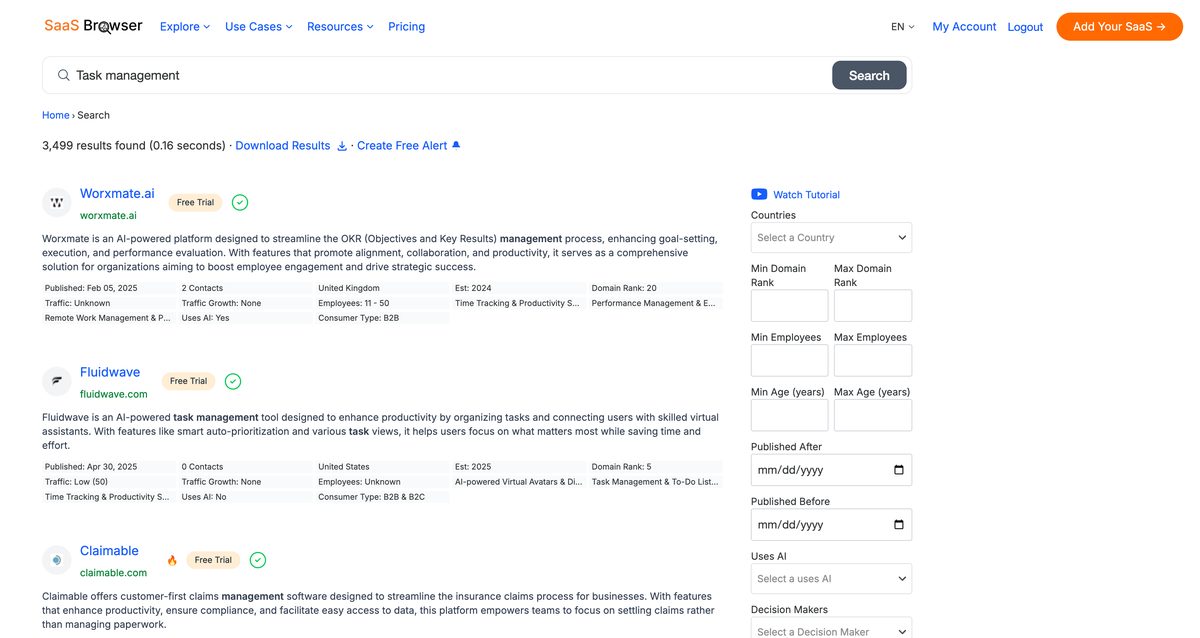
What did they lead with? What did they skip? You’ll spot patterns fast and more importantly, you’ll avoid wasting time on features users won’t care about on day one.
Remember, the MVP is not your product. It’s your first real-world test.
4. Market like a founder, not like a startup
If you’re building a SaaS app solo, don’t try to mimic funded startups with paid ads, SDRs, and launch campaigns. That’s not how successful solo developers break through.
What works is much simpler: get in front of the right people early, talk about the problem you’re solving, and let your work build trust over time.
The best solo SaaS founders treat marketing like product development — iterative, data-informed, and focused on results. Start small. Share your progress in niche communities, post real use cases on Twitter or LinkedIn, and create a landing page that explains your value clearly.
Don’t wait for the app to be perfect. Early adopters don’t expect polish; they expect core tasks to deliver. Show them that your SaaS app is solving a niche problem they care about, and make it easy to sign up or follow along.
Now there is a way to reverse-engineer this process using SaaS Browser.
Use it to explore the SaaS market and find other products targeting the same ICP. See how they position themselves, where they get traffic, and who’s linking to them. You can even build a list of similar SaaS companies and reach out for guest posts, integrations, or partnerships.
Platforms like Product Hunt are useful for visibility, but they’re just a spike. Ongoing success in SaaS development comes from consistency, not one-time launches.
Whether you're using tools like Substack for email updates or building SEO content around your app's core features, remember: solo development isn’t just about code. It's also about showing up. A solo developer can build a SaaS app, but to launch a successful SaaS, you also need to talk about it.
And you don't need a marketing team to do that. You just need a voice, a plan, and the right tools.
5. Make your first dollar: Pricing and payments made simple
Setting up payments is easier than ever for new SaaS. It’s one of the smartest moves you can make early on. Here’s a short checklist of what you need to know to price confidently and get paid as a solo SaaS developer.
- Charge early — don’t wait for a “perfect” product. A simple paid plan filters for serious users and validates real demand.
- Start with one plan — a clear, flat monthly price is easier to test and easier for users to understand.
- Use trusted tools like Stripe, Paddle, or Gumroad — they handle taxes, compliance, and credit card security so you don’t have to.
- Paddle simplifies global sales — especially useful if you want to avoid dealing with VAT and international regulations yourself.
- Free trial > freemium (at the start) — it attracts high-intent users without overloading your support.
- Keep pricing tied to outcomes — charge based on the value your SaaS app delivers, not the number of features.
- Track subscription status via webhooks — stay in sync with upgrades, cancellations, and failed payments automatically.
- Test payments in sandbox mode — always simulate transactions before going live (Stripe has test cards for every scenario).
- Communicate the value, not just the price — your pricing page should explain what users get, not just what they pay.
- Don’t underprice — charging $5/month signals low value. Solo developers can charge $20–50/month when solving a real, painful problem.
- Pricing is never final — iterate based on user feedback and behavior, but grandfather early adopters to build trust.
Focus on building a SaaS product people want to pay for, then make it easy for them to do so.
Bonus tips to build and grow your SaaS app effectively
Even with the right idea and MVP, developing a SaaS app solo comes with dozens of moving parts. Here are some practical tips to help you stay focused, build faster, and run your app effectively, without burning out.
- Automate testing early
Use automated testing tools like Cypress or Selenium to catch bugs before they reach users — even a basic test suite helps you ship updates with confidence. - Pick cloud services that fit your workload
Platforms like AWS, Google Cloud, or AWS Elastic Beanstalk help solo developers deploy and scale without deep DevOps experience. - Use a managed hosting provider
For simpler infrastructure, tools like Heroku, Render, or Vercel help you launch faster and focus on building features, not fighting servers. - Keep feature requests organized
Track user feedback to prioritize what to build next. Adding new features based on real usage helps turn your app into a successful software as a service, not a feature soup. - Create a clear backup and recovery plan
A functional SaaS app needs regular backups. Most cloud platforms offer automated options. Don’t wait until you lose data to set it up. - Offer regular updates and communicate them
Even small improvements or fixes show momentum. A simple changelog or monthly update builds trust and keeps early adopters engaged. - Solve one specific problem deeply
The most profitable SaaS apps don’t try to do everything. They focus on solving a specific problem better than anyone else. - Document your deployment process
Solo founders often forget to document until it’s too late. Writing down how you deploy, debug, and scale will save you when things break. - Treat support like product development
Quick, human responses and a simple knowledge base can make up for a missing feature, Marketing and customer support are part of the experience. - Build something that fits your lifestyle
Whether you're working from home or part of the digital nomad crowd, going solo means you can create a SaaS app that supports your freedom and schedule. - Don’t skip over data privacy
Without proper handling of user data, your app could face compliance risks. Even simple policies and HTTPS by default go a long way in protecting your SaaS model. - Learn to say no
Every “yes” to a random feature slows down your focus. Stay lean, say no often, and build what aligns with your vision and your users' needs.
Build smarter with SaaS Browser
Building a SaaS app solo is absolutely possible, but working harder is just a small part of the equation. It’s about choosing the right idea, validating it fast, and focusing your time where it matters most. That’s exactly where SaaS Browser gives you an edge.
Instead of guessing what’s out there or scraping the web for outdated data, SaaS Browser lets you search through 800,000+ live SaaS products, filter by audience, tech stack, business model, traffic, backlinks, and more. You can uncover real opportunities others miss. You can track which categories are saturated, which apps are gaining traction, and where there’s room for a sharper, simpler, more focused solution.
In other words, it helps you avoid building another “meh” app and start building something with real demand from day one.
Whether you're brainstorming your next SaaS project or ready to validate your MVP, SaaS Browser helps you launch faster, with clarity and confidence. It’s the tool I wish I had from day one.
Explore SaaS Browser and build like you already know what the market wants.